Posts

Showing posts with the label Education

Auto Shutdown

Image
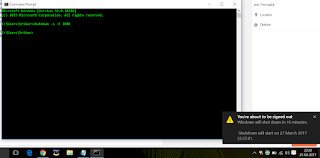
Hi guys . . . This is a short tutorial about setting automatic Shutdown without the need for any third party software/tool. Let's get into it. It can be done in two ways . . .  Method 1 Using CMD Open CMD and type the following code into it shutdown -s -t 1000 (The number 1000 is 1000 milliseconds. Change it depending on the amount of time you want the system to be on.) If you want to abort this automatic shutdown then type the following code into the prompt shutdown -a (This aborts the automatic shutdown which has been initiated from the previous command.) Method 2 Using a batch file Batch files are generally used to execute a set of commands on launching them. In order to create a batch file for automatic shutdown, open Notepad. Type the following code into it. shutdown -s -t 1000 (The number 1000 is 1000 seconds. Change it depending on the amount of time you want the system to be on.) If you want to abort...

Find your college

Hi guys... Most of us will be eager to know what college you would be getting.  Here are the answer to your curiosities... Share your marks, interests, doubts with us and know those answers in the comments section below... Feel free to share them.

Download online videos without any software

Image
Hey guys.... You will find many interesting videos on Youtube. Some videos you like them so much that you may want to donwload them. But if you don't know how, I'm there to help you...... If you don't want to read the whole matter, Check out this video :  https://www.youtube.com/watch?v=REqU_PaPVkc Step 1) Find the video you need.  (If you are using mobile then open the video by a browser not by the app....because you will need the url(web address)).  Once notice the marked area in this pic.. . Step 2) Click the url(web address) and type "ss" before "youtube" like this... Again look at the marked area. Step 3) Next you will be directed to the video download page... Choose your format in the dropdown box arrow menu and download.... Now you can add your favourite video to your collection in a very simple step... NOTE : The same steps have to be followed though you are using a mobile. I repeat you ha...

JEE Counselling - Freeze , Float , Slide

What are the meaning of the terms 'Freeze', 'Float' and 'Slide' ? Ans.These three options allow a candidate to either retain the seat allocated or to opt for a change in seat as per candidate's preference in any of the institutes or in the same institute in which the seat is allocated. (1)  Freezing:  Candidates  accept  the  offered  seat  and  indicate  that  they are  content  with  the  allocated  academic  program  and  that  they  do  not want  to  participate  in  further  rounds  of  seat  allocation.  Such  candidates will NOT be considered in subsequent rounds of admission. (2)  Floating:  Candidates  accept  the  offered  seat  and  indicate  that,  if admission  to  an  academic  program  of  better/higher  preference...